Case Study · Operations / Data
Automated File-Based Data Synchronization
Dual-trigger ingest that parses Excel uploads from Google Drive into a normalized Sheets database.
The Challenge
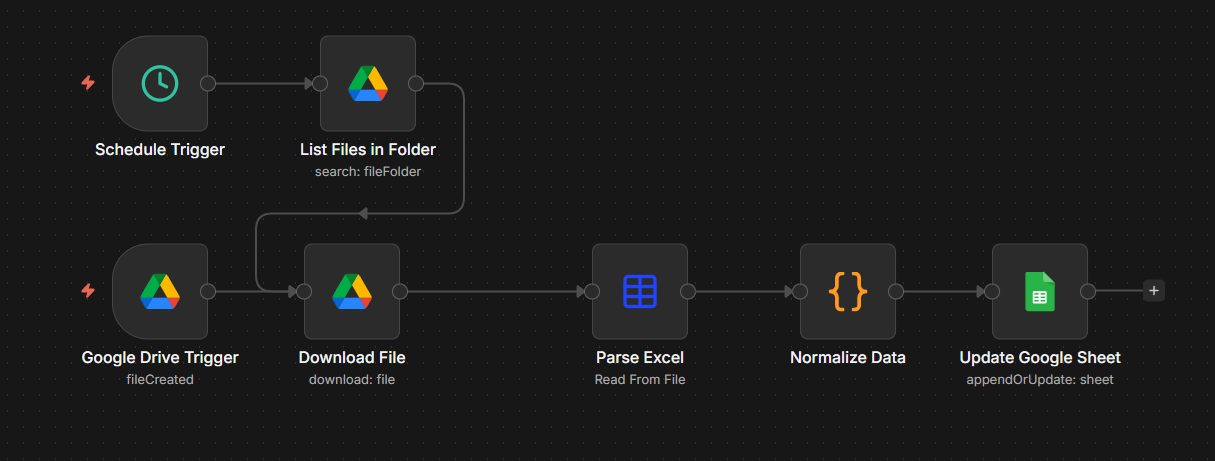
Synchronize debt data from Excel files uploaded to Google Drive into a central Google Sheets database with normalization.
The Solution
- Dual triggers: scheduled sync + file-upload detection.
- Automatic file download from Google Drive.
- Excel file parsing and data extraction.
- Data normalization with format conversion.
The Result
Drop an Excel file into a shared Drive folder — within seconds it's parsed, normalized, and merged into the central Sheets database.
0manual imports
fully automated ingest
System Status
All syncs operational
Technology Stack
Google Drive API
Excel Parsing
Google Sheets API
JavaScript
Error Handling
Business Impact
Dual-trigger ingest that parses Excel uploads from Google Drive into a normalized Sheets database.
Eliminated manual file-import process.
Real-time data synchronization.
Reduced data-entry errors.
Complete file-history tracking.
Supports daily syncs + on-demand uploads.
7
nodes
Workflow Complexity
Dual-trigger architecture · File processing
Want similar results?
Stop spending hours on manual tasks. Let's scope your automation in a free 30-minute call.
Book Free Consultation