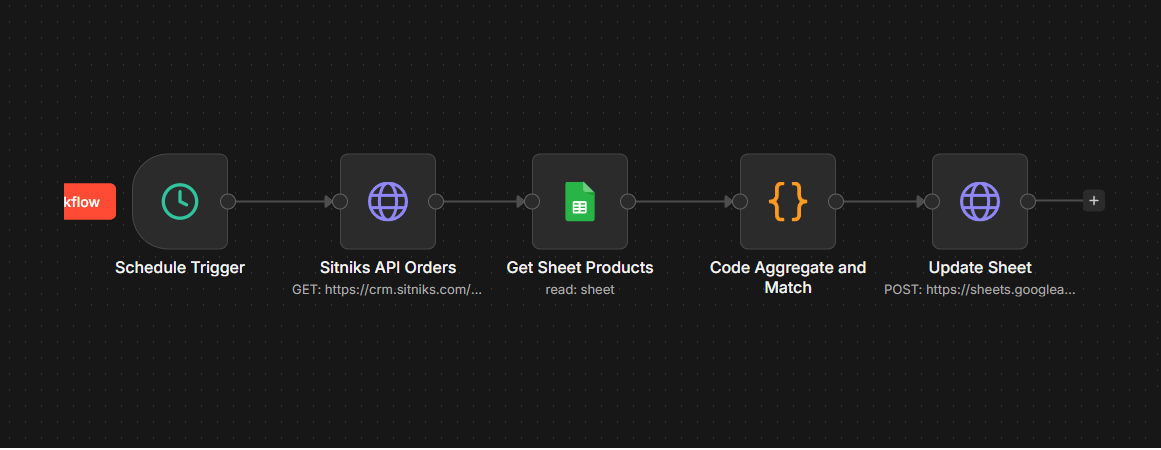
For a clothing store, a client of an advertising agency, we automated the handover of sales data. Every day n8n pulls orders from the Sitniks CRM, matches them to products and writes the number of units sold that day into a Google Sheet. The client used to enter these numbers by hand. Now the agency’s marketers use them.
The project in brief
- Client: a clothing store. We don’t name it.
- Users: marketers at an advertising agency.
- Systems: Sitniks, n8n, Google Sheets.
- Launch: summer 2026.
- Status as of 27 November 2026: running daily.
Why the agency needs real sales
To track advertising campaigns more effectively, the agency needs the client’s real sales. The ad account shows what happens with the ads, but what was actually bought is known to the store.
So the result depends on whether the client sends the data and how promptly.
Before: manual numbers with delays
The client filled in the number of units sold per day in the spreadsheet. It was inconvenient: the data was sent late, and sometimes it could be forgotten. That is a problem for advertising, because campaigns need to be judged against fresh sales.
How it works now
The n8n diagram has five nodes:
- Schedule. The workflow starts automatically every day.
- Orders. n8n pulls orders from the Sitniks CRM through its API.
- Products. It reads the product list from a Google Sheet.
- Matching. Code totals the sales and matches them to the products in the sheet.
- Writing. The result is written into the Google Sheet.
What goes into the sheet is the day’s sales, in units. More than 50 products are processed every day.
What we had to fix: the 50-order limit
At first the workflow fetched only the first 50 orders. When orders and sales grew, some products stopped appearing in the report. We raised the fetch limit to 200 orders.
This is a practical lesson for any CRM integration: check not only that a run finished, but also how many records the API returns per request and whether that is still enough as sales grow.
What changed
The client no longer needs to fill in daily sales by hand. The data reaches the sheet on a schedule, and the agency’s marketers use it in their advertising work. The rest of the solution is simple: five nodes and three systems.
How it connects to the ads-to-sales report
This project is connected to the ads-to-sales report case. That one describes the wider solution for the agency: how ad spend appears next to sales. Here we covered one practical task within it: getting sales from the store without manual entry.
Who this fits
An online store that already keeps its orders in a CRM but still has to move product sales into a separate spreadsheet for a marketer or an agency. To get started you need API access to the orders, a spreadsheet with the products and a way to match each product in the CRM to one product in the sheet.
See our pricing and the article on e-commerce automation.
FAQ
What exactly is written into the sheet?
The day’s sales: the number of units sold per product.
How often is the data updated?
Once a day on a schedule. It is not a real-time update.
Does the system send warehouse stock levels?
Not in this project: it records daily sales.
What if the number of orders grows?
Check how many orders a single run fetches. In our project the 50-order limit had to be raised to 200. If there can be more orders than the limit, the fetch needs to be reviewed again.
How much does a similar solution cost?
It depends on the CRM, the structure of the sheet and how products are matched. See the pricing page for reference points. If you are not sure where to start, there is an automation audit.